When developing business applications, the discussion around productivity often focuses on backend frameworks, persistence, or architecture. Yet one of the biggest productivity factors sits in a different place: the UI layer.
In practice, the speed and quality of UI development depend heavily on one thing: the component model provided by the framework.
What Is a UI Component?
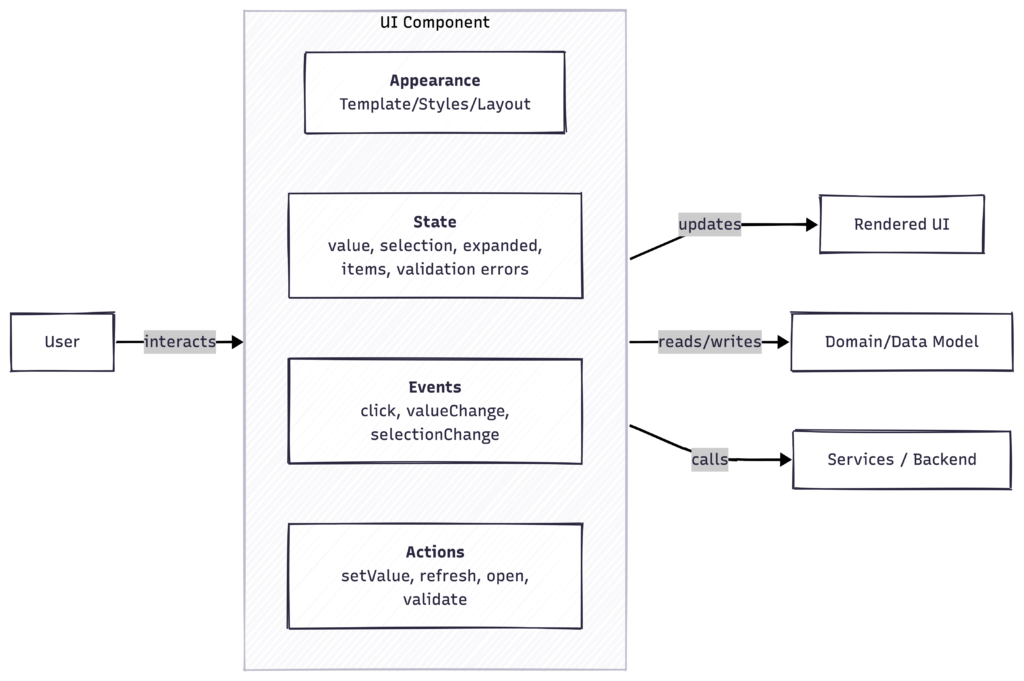
A UI component is often misunderstood as just a visual element. In reality, it is a structured unit of behavior that encapsulates several aspects:
- Appearance
How the element is rendered and laid out on screen - State
The data it currently holds or represents
Examples: selected row, input value, expanded section - Events
Signals emitted when something happens
Examples: click, value change, selection change - Actions
Operations that can be triggered externally
Examples: refresh data, validate input, open dialog
A component, therefore, acts as a self-contained interaction unit. It exposes a well-defined API while hiding internal complexity.
A data grid, for example, is not just a table. It manages scrolling, rendering, selection state, keyboard navigation, and data loading. Developers interact with it through configuration, listeners, and method calls rather than implementing these mechanics themselves.
This encapsulation is the core reason components increase productivity.
The Hidden Cost of Building Everything Yourself
Without a strong component model, developers spend a significant amount of time reinventing common UI behavior:
- Data tables with sorting, filtering, and paging
- Form validation and binding
- Layout composition
- Accessibility and keyboard handling
- State synchronization
These concerns are not business value. They are infrastructure.
When a framework does not provide ready-to-use abstractions, the team writes and maintains large amounts of glue code. The result is slower delivery, more defects, and code that is harder to evolve.
What a Good Component Model Provides
A strong component model moves these responsibilities into reusable, well-tested building blocks. This shifts the development focus from mechanics to business behavior.
Typical characteristics of an effective model include:
- Rich, high-level UI components
- Consistent APIs across components
- Built-in lifecycle and state handling
- Integrated data binding
- Accessibility handled by default
Instead of assembling low-level primitives, developers compose functionality from domain-relevant building blocks.
A Practical Example
Frameworks such as Vaadin demonstrate how this approach changes the development experience.
Components like:
- Data grids with lazy loading
- Binder-based form binding and validation
- Layout primitives and cards
- Integrated event handling
allow teams to express intent directly in code.
You describe what the UI should do rather than implementing how it works internally. This leads to:
- Less boilerplate
- Smaller codebases
- Faster iteration cycles
- More predictable behavior
From experience in enterprise projects, the productivity difference is substantial. When teams switch from constructing UI infrastructure manually to composing from components, development speed increases and cognitive load decreases.
Impact on Architecture and AI-driven Development
The importance of component models becomes even clearer in spec-driven or AI-assisted workflows.
When AI agents generate or update UI code, they operate more reliably with stable, well-defined abstractions. A consistent component model provides:
- Predictable generation targets
- Fewer edge cases
- Clear mapping from specification to implementation
Instead of generating large amounts of custom UI logic, the agent composes components. This aligns well with incremental spec-to-code synchronization and keeps generated code maintainable.
Conclusion
UI productivity is not primarily about the programming language or rendering technology. It is about abstraction quality.
A strong component model:
- Reduces accidental complexity
- Encourages consistency
- Improves maintainability
- Accelerates delivery
Choosing the right component model is therefore not a UI decision. It is an architectural one.