
OpenSpec describes very precisely what a system must do. But nowhere does it show, in one piece, how a user moves through the application step by step. This is not a bug in the tool. It is a deliberate decision of the format, and it has consequences.
I migrated the Spring PetClinic to OpenSpec. The result was five capabilities with 31 requirements and 52 scenarios. Then came the obvious question: where do I actually see the flow from the user’s perspective? In this post, I answer that question and compare OpenSpec with the AI Unified Process. The AI Unified Process puts exactly this user perspective at its center.
How OpenSpec Describes Behavior
OpenSpec splits a system into capabilities. Each capability is a file openspec/specs/<capability>/spec.md with three levels:
- Purpose: two or three sentences on what the capability is for.
- Requirements: individual rules, written as “The system SHALL …”.
- Scenarios: concrete cases per requirement in WHEN/THEN format. They serve as acceptance criteria and as templates for tests.
This is what it looks like in the PetClinic:
### Requirement: Find owners by last name

The system SHALL let staff search owners by the beginning of their last name.

#### Scenario: Exactly one owner matches

- **WHEN** staff search for "Fra" and exactly one owner's last name starts with "Fra"
- **THEN** staff are redirected straight to that owner's details page
New features are created as a change in openspec/changes/<name>/. A change consists of a proposal.md (why and what), an optional design.md, a tasks.md, and delta specs. The delta specs state which requirements are added, modified, or removed. When the change is archived, the deltas are merged into the main specs. So the specs always show the current state of the system.
Why the Flow Is Missing
OpenSpec describes rules, not flows. A scenario shows exactly one interaction: one user action and the system’s response. It does not describe the order of steps, the context before and after, or the path through several screens.
On top of that, a flow runs across capabilities. Canceling a visit in the PetClinic touches four spec files:
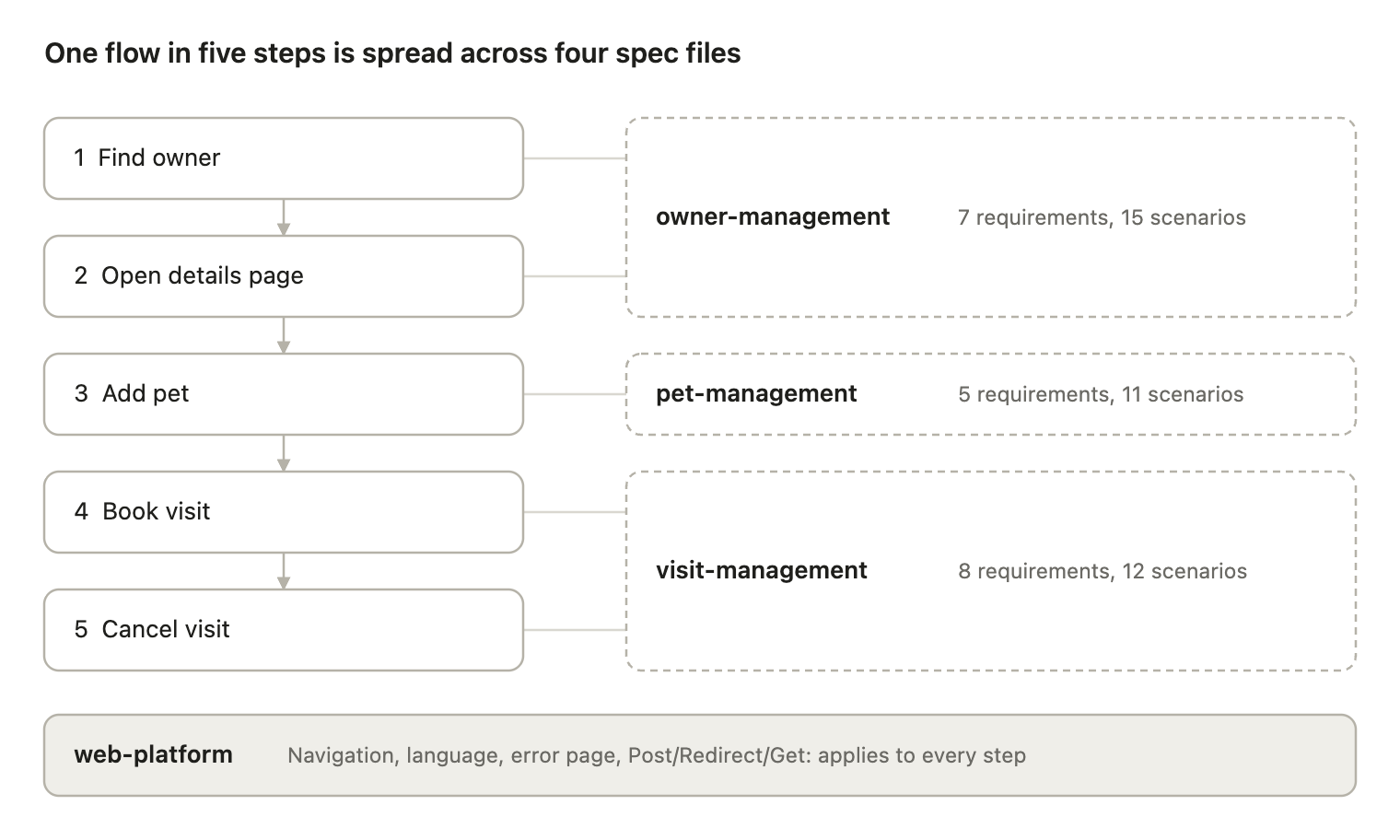
The order only exists in the reader’s head or in the navigation of the UI. No file contains the path from the search to the cancellation. Alternative paths are scattered too: “No owner found” is a scenario in owner-management, while “A past visit cannot be canceled” is a separate requirement in visit-management.
The format is built for deltas. Rules can be added, modified, or removed cleanly per change. A flow across four files does not fit this scheme. The price: whoever reviews the specs sees individual rules, but not whether the flow as a whole is complete.
How to Close the Gap
If you need the user perspective in OpenSpec, you have three options. They differ in how much extra maintenance they cost.
- A user journey in the purpose: A short numbered flow in each spec, right below the purpose. OpenSpec only parses requirements and scenarios, so the text does no harm. The downside: the flow ends at the boundary of the capability.
- A separate
openspec/journeys.md: The most important end-to-end flows as a numbered list or a Mermaid diagram, each step linked to its requirement. This covers flows across capabilities. But the file is not part of the change workflow, and nobody checks whether it is still correct after an archive. - Use cases alongside: Classic use case specifications with a main success scenario and alternative flows. This is closest to the user perspective, but it means a second spec format that must be maintained in parallel.
The third option leads directly to the question of why not work with use cases from the start. That is exactly what the AI Unified Process does.
The AI Unified Process in Comparison
The AI Unified Process starts with the user and works its way to the code. Its artifacts live in docs/, have IDs, and reference each other:
- Requirements catalog: functional requirements as user stories (FR-XXX), measurable non-functional requirements, constraints, and a glossary.
- Use case diagram: PlantUML with actors and use cases as an overview.
- One use case specification per use case (UC-XXX): actors, preconditions, the main success scenario step by step, alternative flows, postconditions, and business rules. This is the flow from the user’s perspective that OpenSpec does not have.
- Entity model: a Mermaid ER diagram with attributes, data types, and validation rules.
- Business processes (BP-XXX): BPMN with one lane per actor. Every activity is a use case. This shows flows across roles and use cases.
- Test cases (TC-XXX): end-to-end journeys that chain several use cases with concrete test data. They are derived from processes and automated as browser tests.
On top of that, there are tools that check the chain. A spec review lints the artifacts against each other and creates a traceability matrix. A coverage check shows for each use case which steps, alternative flows, and rules have code and tests behind them. For the implementation, there are skills for a concrete stack, for example Vaadin with jOOQ.
For the PetClinic, this would mean: “Cancel visit” would be a use case with a main success scenario (find owner, select pet, cancel visit, confirmation) and the alternative flow “visit is in the past”. The whole path from the search to the cancellation would be a test case.
Existing Applications: No Flow, No Validation
The difference is most obvious with existing applications. Before deltas make sense, you need a baseline: specs for what the application does today. OpenSpec does not provide a skill for this. The propose, apply, sync, and archive workflows assume the baseline already exists.
In the PetClinic, an agent derived the five specs ad hoc from controllers, entities, and templates. The purpose says so: “Reverse-engineered from OwnerController …”. Someone who knows the application from the business side has to check whether the result is correct. That person gets 31 rules and 52 scenarios. They can confirm each rule on its own. But they cannot see whether a step, a screen, or a special case is missing, because nothing connects the rules into a flow. Gaps between requirements stay invisible.
The AI Unified Process has a dedicated step for this. /reverse-engineer generates a use case diagram, use case specifications, and an entity model from the existing code. Domain experts walk through the main success scenario the way they work with the application: find owner, select pet, cancel visit. If a step or an alternative flow is missing, they notice it while reading. The spec review also checks whether the artifacts fit together. I describe how this works in detail in Reverse Engineering Existing Code into Specs.
This does not make reverse-engineered use cases automatically correct. They describe what the code does, including its bugs. But they have a form that a human can check against their knowledge of the application. A list of rules lacks exactly that.
Pros and Cons
The AI Unified Process provides what OpenSpec lacks: the flow from the user’s perspective, a path from existing code to reviewable specs, a data model, and traceability down to the test. OpenSpec, in turn, is easier to get started with and tracks individual changes more cleanly.
| Criterion | OpenSpec | AI Unified Process |
|---|---|---|
| Flow from the user’s perspective | Only individual scenarios, spread across capabilities | Main success scenario and alternative flows per use case, processes across use cases |
| Existing applications | No reverse engineering, the baseline is created ad hoc and is hard to validate without a flow | /reverse-engineer generates use cases and an entity model from the code, domain experts validate along the flow |
| Validation by domain experts | Rules can be checked one by one, gaps between rules stay invisible | Familiar use case format, missing steps stand out when walking through |
| Data model | No separate artifact, hidden in requirements and code | Entity model with ER diagram and validation rules |
| Traceability | Requirement → scenario → test, no IDs across files | IDs from FR via UC and BP to TC, traceability matrix and coverage check |
| Test derivation | A scenario becomes a unit or web test | Use cases become view tests, test cases become end-to-end tests |
| Tracking individual changes | Strength: delta specs with ADDED, MODIFIED, and REMOVED, archive as history | Changes go directly into the use cases, history through Git |
| Getting started | Fast: /opsx:propose creates proposal, design, tasks, and delta specs in one step |
More upfront work: requirements, diagram, use cases, and entity model before the first line of code |
| Maintenance effort | Low, one file per capability | Higher, several artifacts must stay consistent, the spec review helps |
| Stack | Independent, project rules in openspec/config.yaml |
Method is independent, implementation skills for concrete stacks such as Vaadin with jOOQ |
Two points stand out in practice. With OpenSpec, the change workflow is so smooth that you quickly forget how little of the overall flow is captured. With the AI Unified Process, it is the other way around: the big picture is there, but every small change touches several documents, and without a spec review they drift apart.
Conclusion
OpenSpec answers the question “What applies?”, the AI Unified Process answers “What does the user do?”. Which question matters more depends on the project:
- AI Unified Process: existing applications whose behavior must first be captured and confirmed by domain experts. Also new applications, flows across several roles, and wherever a requirement must be traceable down to the test.
- OpenSpec: small, well-defined features in a project whose flows the team already knows and does not need to align with domain experts.
The flow from the user’s perspective is not documentation for later. It is what domain experts use to check whether the spec is correct. If you stay with OpenSpec, you can add a journeys.md with links to the requirements and maintain it with every archive. The AI Unified Process makes this flow the central artifact from the start.